Plant Identifier & Plant Care
- 4.3
- Rating
- 1.00M
- Installs
- Free
- Price

 Analysis by App-foxy
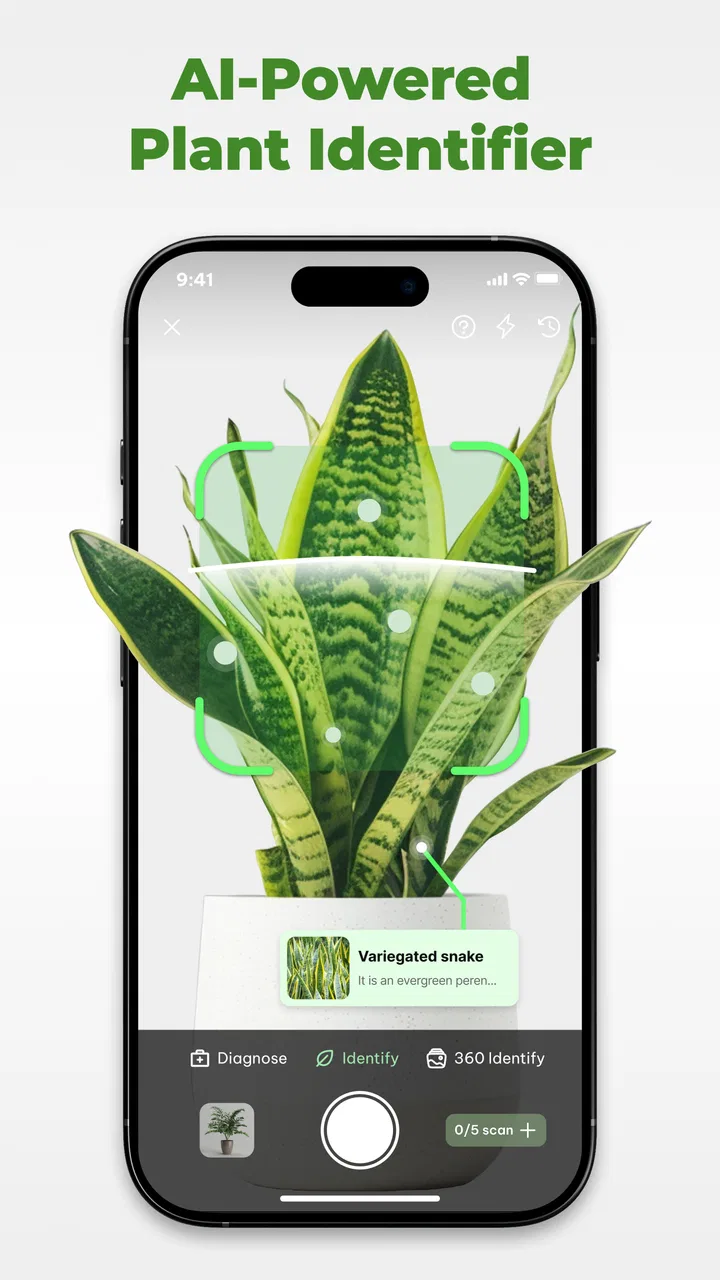
Plant Identifier & Plant Care is the kind of education app I would keep on my phone for those moments when a plant catches my attention and I have no idea what it is. I tested it with the mindset of a first-time user rather than an experienced gardener, and its main appeal became clear quickly: it tries to turn an unfamiliar leaf, flower, or tree into a useful starting point for learning and care. The experience is built around identification, followed by guidance that can help you decide what to do next.
The app is free to install, and Braly JSC presents it as a practical tool for recognizing plants, trees, and flowers. It belongs to the education category, but it feels more hands-on than a traditional reference book because the object in front of you becomes the lesson. With a 4.2 average from around 5,000 ratings and more than a million installs, it has clearly found an audience among casual plant owners and curious beginners. I can understand that appeal, although I would not treat any phone-based identification as a substitute for expert advice when a plant may be poisonous or seriously unhealthy.
What the first use is really like
My advice is to approach Plant Identifier & Plant Care as a helpful first opinion, not as an infallible botanical authority. The most satisfying use is straightforward: you see a plant, capture a clear image, receive a likely identification, and then use the care information to form a sensible plan. That sequence makes the app feel useful even if you are not trying to build a large collection.
You May Also Like

 Blood Strike: 2.5 Anniversary
Blood Strike’s Loadouts Turn Every Drop Into a Tactical Gamble
A close look at Blood Strike’s custom loadouts: how fast access to signature weapons reshapes its battle royale rhythm, rewards preparation, and narrows the gap between fights.

 Pandora - Music & Podcasts
Pandora’s Music Is Easy to Start, but Harder to Recover
Pandora’s strength is its low-effort path from a seed to a station. Its weak spot is how much confidence it asks you to place in connection, setup, and quiet recovery.

 8 Ball Pool
 Is Built on Rivalries, Rematches, and Routine
A close look at the rivalries, rematches, shared routines, and unanswered safety questions that turn a quick pool match into a persistent mobile community.

 Samsung Music
’s Quiet Strength Is Playing What You Already Own
Its reach comes less from spectacle than from dependable access to a personal library. That simplicity is both the app’s strongest retention engine and its ceiling.

 AccuWeather: Weather Radar
AccuWeather Review: A Quick, Clear Forecast for Everyday Decisions
For everyday plans, the best forecast is the one you can understand quickly. AccuWeather makes rain timing, radar, and local conditions easy to act on, with a few trade-offs.

 Hill Climb Racing
Why Hill Climb Racing Still Turns Crashes Into One More Run
A tiny car, a bumpy hill and one more upgrade: Hill Climb Racing keeps resurfacing because its simple chaos makes every near-miss feel personal.
More From Our News Desk



The app is particularly approachable for someone who has just received a houseplant without a label, moved into a home with an unfamiliar garden, or found a wildflower during a walk. It can also be useful for parents and children who want to turn an outdoor stroll into a small learning activity. Instead of asking a child to memorize plant names first, I would use the app to encourage observation: look at the shape of the leaves, the arrangement of flowers, the texture of the stem, and the surroundings where the plant grows.
There is a practical distinction between identifying a plant and caring for it. Identification gives you a name or likely match; care guidance helps you think about light, watering, placement, and general maintenance. I found that separation important because beginners often make the mistake of watering or repotting immediately after buying a plant. A name alone does not tell you what the plant needs today. The care section is more valuable when you use it to slow down and check the plant’s actual condition.
The best result comes from treating the app as a decision aid rather than a final verdict. If the suggested plant looks plausible, compare the visible details with the result before acting. A similar-looking species may have different light or watering needs, and a damaged leaf can make recognition less reliable. That small pause is one of the easiest ways to avoid turning a convenient identification into a costly care mistake.
Getting ready without overthinking it
On a first visit, I would not begin by photographing the entire plant from across the room. A single leaf or flower can be too small in the frame, while a cluttered background can make the important details harder to read. Move close enough to show the plant clearly, but keep enough of it visible to provide context. If the plant has distinctive flowers, fruit, bark, or leaf edges, include those rather than relying on a blurry general view.
Good lighting matters more than an elaborate setup. Natural light is usually easier to work with than a dark corner or a harsh flash. I would avoid placing the plant directly in front of a bright window, because strong backlighting can turn the leaves into silhouettes. A steady image with visible color and texture is a better starting point than several rushed pictures.
The first setup should also include a realistic expectation about the app’s audience. It is designed for everyday discovery, not for replacing a herbarium, a specialist field guide, or a professional plant pathologist. If you are trying to identify a common indoor plant, garden flower, tree, or recognizable wild plant, the experience makes sense. If the subject is a tiny seedling, a heavily damaged specimen, or a plant with only one ambiguous feature, you may need another source to confirm the result.
The app is rated for Everyone, which fits its accessible tone and educational purpose. It runs on Android devices using version 7.0 or later, so many older phones can still be considered. The current version is 4.4.0. I would still check that your device can take reasonably clear photographs, because the camera itself has a bigger effect on the experience than the age of the app.
Reaching the first meaningful success
For a first attempt, choose a plant with obvious features. A flowering plant with several open blooms is a better test than a bare stem or a single damaged leaf. Hold the phone steadily, make sure the subject fills a useful portion of the image, and take a moment to check whether the key features are actually visible. That simple workflow gives the identification process a fair chance.
When a result appears, do not stop at the name. Read the care material as a second stage of the task. I would look for guidance that helps answer immediate questions: should this plant be placed in brighter or softer light, does it seem suited to indoor conditions, and is the current watering routine likely to be too frequent? These questions are more useful than collecting names without changing how you care for the plant.
A realistic example is a newly purchased plant from a local market. The label may be missing, abbreviated, or too vague to guide you. I would photograph the leaves and flowers before moving the plant, check the suggested identity, and then compare the care guidance with the conditions at home. If the result points toward a plant that prefers brighter light, I would not place it automatically on the darkest shelf. I would first consider a bright location and watch how the plant responds over time.
Another useful scenario is an older houseplant that has started developing yellow leaves. Identification cannot diagnose every cause, but it can prevent you from applying the wrong general advice. Once you have a likely plant type, you can interpret the care guidance in context: yellowing may relate to watering, light, drainage, seasonal change, or a more serious issue. The app helps narrow the conversation; it does not remove the need to observe the plant.
One non-obvious advantage is that identification can improve how you search for further information. “My plant has brown leaves” is a vague query. A likely plant name combined with the visible symptom is much more focused. I would use the app to establish that starting point, then verify unusual symptoms through a trusted gardening source or a local expert. This makes the app useful even when the first result is only a lead.
Where beginners can get confused
The most common confusion is assuming that a confident-looking result is automatically certain. Visual identification is affected by camera angle, plant maturity, lighting, and the similarity between related species. If the result does not resemble the plant in front of you, do not force the care advice to fit. Retake the image with a different feature in view, such as the underside of a leaf, the flower structure, or the bark.
A second point of friction is the difference between a plant’s ideal conditions and the conditions you currently have. Care guidance is a starting framework, not a command to change your entire home. A plant may prefer bright indirect light, but the practical solution could involve moving it gradually rather than placing it immediately in intense sun. Likewise, watering advice should be combined with the soil’s moisture and the pot’s drainage. Calendar-based habits are often less reliable than checking the plant and its growing medium.
I also recommend caution with outdoor plants. An identification result may be useful for learning, but it should not be the sole basis for eating a wild plant, preparing a home remedy, or allowing a pet to chew it. In those situations, the cost of a wrong match is much higher than the convenience of a quick answer. The sensible boundary is simple: use the app for recognition and education, then seek authoritative confirmation for safety-critical decisions.
Another thing a first-time user may wonder about is cost. The app is free, but it includes in-app purchases ranging from about three dollars to nearly sixty-five dollars per item. That means it is worth paying attention to any purchase screen and deciding whether the free experience already meets your needs before committing to anything. For occasional identification, I would begin with the free access and judge the app by the usefulness of its results and guidance rather than assuming that paid access is necessary.
The free-to-use positioning makes sense for someone who identifies a plant once in a while. A dedicated collector, nursery worker, or frequent gardener may place a higher value on deeper tools or repeated use, but the decision should depend on the actual workflow rather than the promise of having more information. If you only need a name for one unknown plant, a library book, a local gardening group, or a specialist identification service may be a better fit for confirmation.
Using the care guidance more intelligently
I found the care material most helpful when I treated it as a checklist for observation. After identifying a plant, I would inspect its current position, the direction of the light, the condition of the leaves, and the moisture of the soil. This creates a small feedback loop: identify, compare the recommendations with the environment, make one careful adjustment, and observe before making another.
That “one adjustment” rule is a valuable habit. Beginners often change light, watering, fertilizer, and pot location all at once. If the plant improves or declines, they then have no idea which change caused it. Plant Identifier & Plant Care is better used as a guide for selecting the next question, not as a reason to perform every suggested task immediately.
A second practical tip is to photograph the same plant again when its appearance changes. You can use a later identification attempt as a prompt to reassess whether the plant is showing stress, new growth, or seasonal differences. I would not expect the app to function as a complete long-term plant journal, but repeated observation can make its educational value more meaningful than a single name lookup.
A third insight concerns comparison. If two plants look similar, do not compare only their colors. Look at leaf arrangement, edges, shape, flower structure, and stem form. Those details can help you decide whether a result makes sense and can also teach you what the app is using visually. Over time, this makes you less dependent on automatic recognition because you begin noticing the same botanical clues yourself.
For households with several plants, I would use the app in batches but avoid rushing. Identify one plant, note the care implications, and then move to the next. Grouping plants by similar light needs can be more useful than arranging them by appearance. The app may help you learn which plants can share a bright windowsill and which ones need a gentler position, but the final arrangement still depends on your home’s conditions.
How it compares with familiar alternatives
The usual alternative is a general web search. Searching can provide much deeper material, but it often produces a mixture of similar images, conflicting advice, and results that assume you already know the plant’s name. Plant Identifier & Plant Care has an advantage at the beginning of that process because it connects the visual question with a care-oriented next step. It reduces the amount of searching needed before you have a useful direction.
A printed field guide is better when you want to study plants carefully, compare related species, or learn regional details without relying on a camera. It also encourages slower observation. I would choose a field guide for serious identification practice, especially outdoors, while choosing this app for convenience when I am standing beside an unknown houseplant or garden specimen.
Human help remains stronger for difficult cases. A local nursery, botanical group, or experienced gardener can ask follow-up questions, inspect the plant from multiple angles, and notice details that a single image misses. The trade-off is speed and availability. The app gives you an immediate starting point; a person is more likely to resolve an unusual or high-stakes identification.
Compared with a basic plant-care reminder tool, this app’s distinctive value is the connection between recognition and guidance. A reminder app may be better if your main goal is scheduling routine tasks for plants you already know. Plant Identifier & Plant Care is more suitable when the first problem is uncertainty: what is this plant, and what kind of care should I investigate?
Who will benefit, and who should skip it
I would recommend it to new plant owners, apartment gardeners, students, families, and curious walkers who want a friendly entry point into plant knowledge. It is also useful for someone inheriting a collection of unlabeled plants or trying to understand why a newly purchased specimen is not thriving. The combination of visual recognition and care information makes the first step less intimidating.
I would be more cautious about recommending it as the only tool for professional growers, collectors of rare species, or anyone making decisions about toxicity, edibility, or treatment of severe disease. Those users need stronger confirmation and more specialized detail. The app can still be part of their workflow, but it should sit near the beginning, not at the end, of the verification process.
People who dislike camera-based tools may also prefer a traditional guide. If you already know your plants and only want watering reminders, a dedicated care organizer could be more focused. This app earns its place when identification is part of the problem, not when identification has already been solved.
My recommendation after using it
Plant Identifier & Plant Care succeeds because it gives a beginner a clear path from curiosity to action: show the plant, consider the likely identity, read the care guidance, and make a measured adjustment. I like that it turns an ordinary moment—finding an unlabeled plant or noticing a worrying leaf—into an opportunity to learn instead of making the user start with technical terminology.
Its limitations are equally important. Image quality and plant condition can affect the result, similar species may require extra checking, and care guidance should not be followed blindly without considering light, soil, drainage, and the plant’s actual symptoms. The presence of purchases also means I would review each offer carefully rather than assuming every useful part is included without cost.
For a free education app from Braly JSC, it offers a practical first step for everyday plant questions. I would install it if I wanted quick help with unknown indoor plants, flowers, or trees, especially while learning the basics. I would keep a trusted reference or human expert in reserve for unusual specimens and safety-sensitive decisions. Used with that level of judgment, Plant Identifier & Plant Care is a reassuring companion for beginners rather than a replacement for careful observation.
FAQs for Plant Identifier & Plant Care
01What features does the Plant Identifier & Plant Care app offer?
The Plant Identifier & Plant Care app provides several key features including plant identification, personalized plant care tips, a watering reminder system, and a plant journal for tracking growth. Users can simply take a picture of a plant to receive detailed information about its species, light requirements, and common care practices.
02How accurate is the plant identification feature of the app?
The app utilizes advanced AI algorithms to ensure high accuracy in plant identification. While most common plants are identified correctly, results can vary with less common species or poor image quality. Users are encouraged to take clear, well-lit photos for the best identification results.
03Is the Plant Identifier & Plant Care app free to use?
The app offers a free version with basic features. However, for access to premium features like unlimited identifications, advanced care tips, and ad-free usage, users can opt for a subscription plan. Pricing details and subscription options are available within the app store listing.
04Can the app help with pest and disease management?
Yes, the Plant Identifier & Plant Care app includes information on common pest and disease issues. While it provides general advice and recommendations for treatment, users should consult a professional for severe infestations or issues that persist despite following the app’s guidelines.
05Does the app require an internet connection to function?
While the app can store your plant journal and reminders offline, an internet connection is required for plant identification and accessing the latest care tips. This ensures users receive the most up-to-date information and identification results from the app’s database.
Pros
- Identifies plants quickly and accurately.
- Includes detailed care instructions.
- User-friendly interface design.
- Offline mode for remote locations.
- Regular updates with new plant info.
Cons
- In-app ads can be intrusive.
- Limited free features available.
- Requires internet for full functionality.
- Occasional misidentification of rare plants.
- Subscription model may deter casual users.

Plant Identifier & Plant Care
Gallery